
Case Study 04
Starwars Film Poster: Film Poster Directory
The goal of this project was to design and develop a responsive film poster directory that dynamically renders content using JavaScript.
Overview
The goal of this project was to design and develop a responsive film poster directory that dynamically renders content using JavaScript. Rather than hardcoding each poster into the HTML, I structured the project so that film data is stored separately and injected into the DOM. This project allowed me to practice modular architecture, responsive design strategies, and dynamic UI rendering.
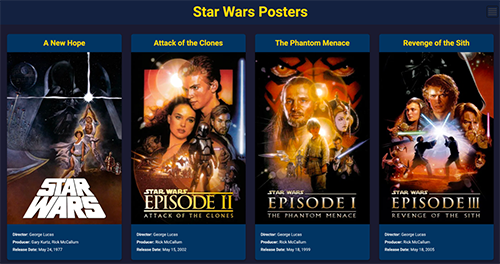
Challenges & Issues
A lot of beginner web projects hardcode content directly into HTML, which works at first but becomes messy as the project grows. If you want to add more items or change the layout, you end up constantly editing the markup. For this poster directory, I wanted to build something that could scale easily and switch between grid and list views without rewriting the entire page.
The biggest challenge was making it feel structured instead of just styled. I focused on separating my data, layout, and logic so the project would be easier to maintain and expand. Using JavaScript to dynamically render the posters helped me build something more flexible and closer to how real world applications are structured.
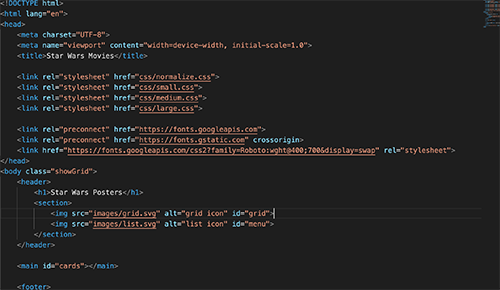
This is how my index.html looks after dynamically rendering elements using JavaScript. As you can see, the HTML is almost empty because the film cards are not hard coded into the markup. Instead, the structure acts as a container, and all of the movie content is generated using JavaScript.
Dynamically Rendering With JavaScript
Instead of writing poster markup directly in HTML, I used JavaScript to loop through the films array and dynamically generate each card. For every film object, the script creates a new element, injects the relevant data like the title, poster image, director, and release date, and then appends the completed card into the DOM. This means the content on the page is built dynamically rather than being hard coded into the html. This approach improves scalability because adding a new film only requires updating the data file, not rewriting the HTML.
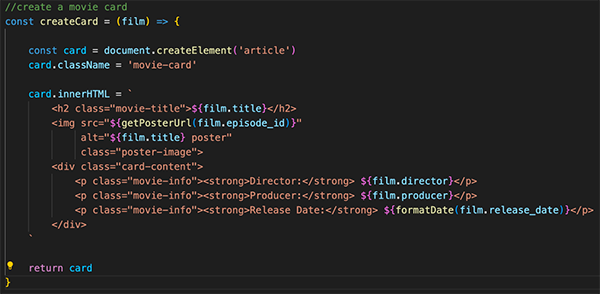
The createCard function dynamically builds a new article element using document.createElement. It injects the film’s title, poster image, director, producer, and formatted release date into the card using template literals. Once the card is fully constructed, it is returned to the populateCards function, which appends it to the DOM using appendChild. This process allows the interface to be generated entirely from data instead of hard coded HTML, making the project more scalable and easier to maintain.
Grid & List View Toggle
In addition to dynamically rendering the film cards, I implemented a grid and list view toggle to give users control over how content is displayed. Instead of rebuilding the layout from scratch, I used JavaScript to change a class on the page, which triggers different CSS layouts. The grid view emphasizes visual browsing with evenly spaced poster cards, while the list view prioritizes readability by stacking information in a more structured format.
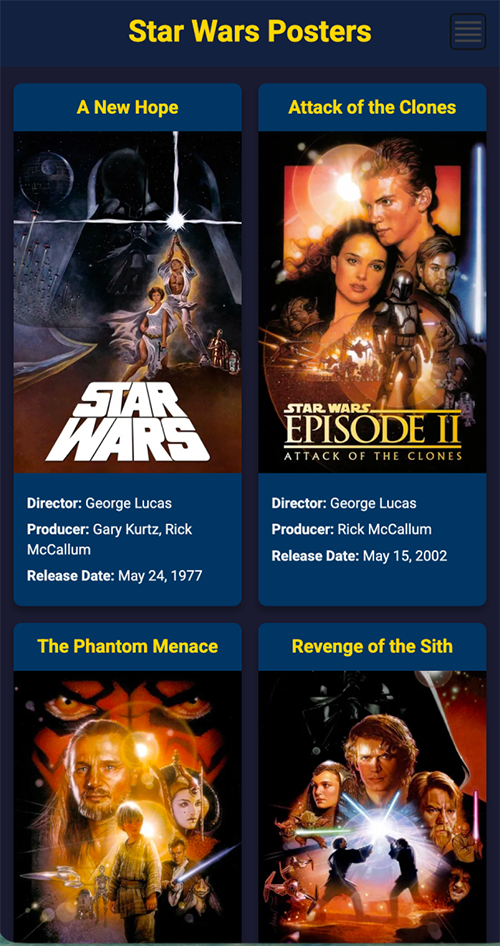
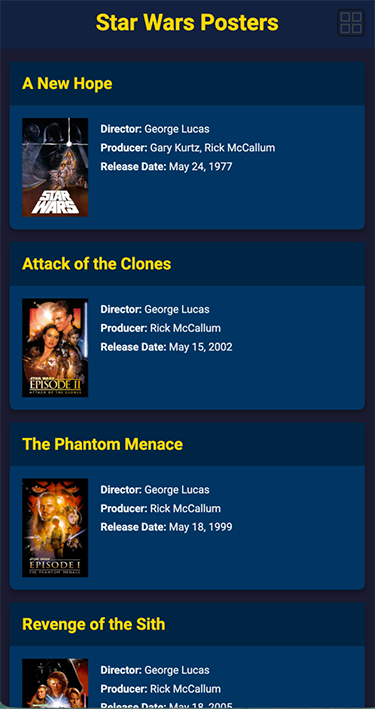
The grid and list views work by changing a class on the <body> element. When the class switches, different CSS rules apply, which changes how the cards are displayed. In grid view, the cards are arranged in columns for visual browsing. In list view, the cards stack vertically and rearrange their internal layout so the poster and text are easier to read. Because the layout changes are handled entirely through CSS, the HTML structure stays the same. This keeps the code clean and makes the feature easy to maintain.
What I Learned
This project helped me better understand how JavaScript interacts with the DOM and how dynamic rendering works in real applications. Instead of thinking about a webpage as static HTML, I started thinking about it as a structure that can be built and modified through code. Creating reusable functions like createCard showed me how separating logic from structure makes a project easier to scale and maintain.
I also gained a better understanding of how small implementation choices impact the overall structure of a project. Separating the data from the HTML and generating content dynamically made the application easier to manage and update. Seeing how the layout could change without rewriting the markup helped me understand how front-end development goes beyond visual design and requires thinking about how everything connects behind the scenes.
Summary & Future Improvements
Overall, this project challenged me to think beyond styling and focus on structure, scalability, and maintainability. By dynamically rendering content, separating data from layout, and implementing a flexible grid and list system, I built a poster directory that functions more like a real world application than a static webpage.
I think If I were to go back to this something I would love to do differently is add a dark and light mode to go with the grid and list toggle to further improve the UI.